
Published 10 October 2026, Updated 10 October 2026
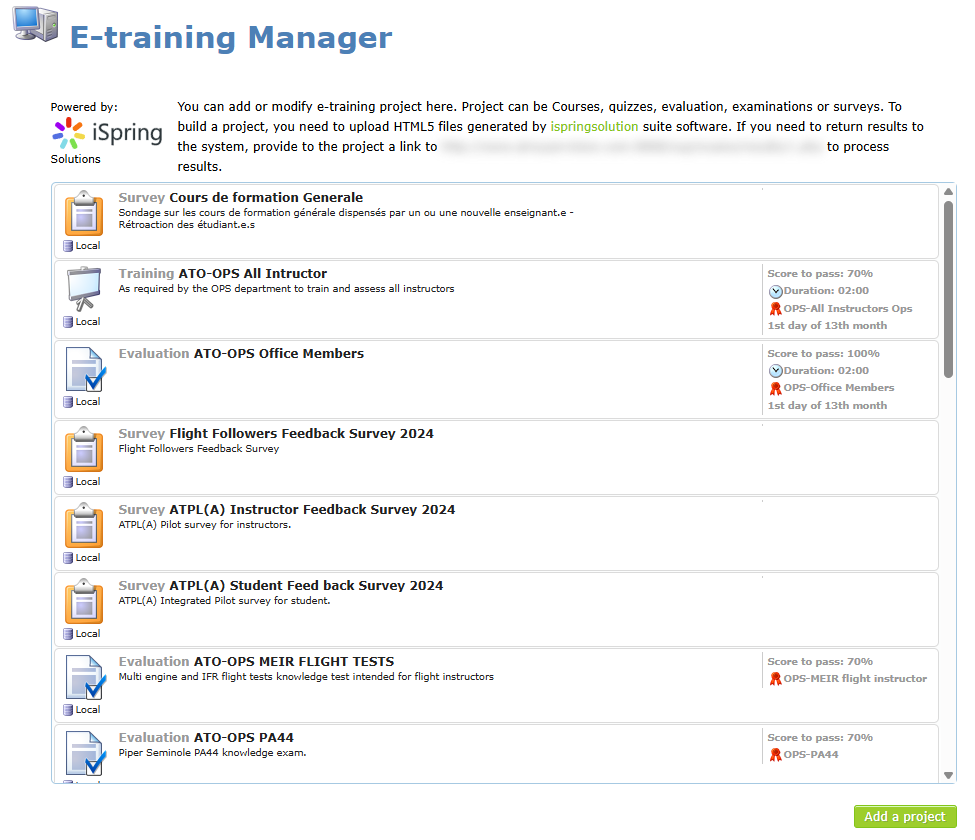
The E-trainings Center (page title E-training Manager) is where staff add, modify and remove the e-trainings offered to members. Open it from the main menu: Controls › E-training center.
E-trainings are built with the iSpring suite: a course, quiz or survey is exported as HTML5 from iSpring, then uploaded here as one ZIP file or linked from iSpring Space.
Who can do what
| Credential or level | What it allows |
|---|---|
| Can manage E-trainings or survey | Opens the E-training Manager and allows adding, modifying and deleting e-trainings. |
| Senior administrator | Sees the list of existing e-trainings on this page, including inactive and hidden ones, and can open the E-training tab of any member’s profile to check their results. |
Members who have the credential without being senior administrators see an empty list and can only use Add a project. Ask a senior administrator to modify an existing e-training.
Reading the list
Each line shows the same information members see (type icon, type, title, description, score to pass, duration, competency renewed and expiry rule), plus where the content is stored:
| Marker under the icon | Meaning |
|---|---|
| Local | The iSpring files were uploaded to AirSupervision. |
| Online | The e-training is hosted on iSpring Space (an iSpring URL is set). |
| No marker | No content uploaded yet. |
Inactive e-trainings are shown in light grey. Click a line to open its details.
Why link e-trainings to competencies
An e-training is most useful when it validates a competency. Competencies are then used elsewhere in the system: required competencies of roles, competencies an instructor must hold to provide a course, competencies required for flight activities, and expiry alerts. When the e-training renews the competency automatically, members stay compliant without any manual update. See Linking an e-training to a competency.
Articles in this chapter
- Adding and modifying an e-training
- Linking an e-training to a competency
- Testing, deleting and deactivating e-trainings