Published 22 February 2026, Updated 4 October 2026
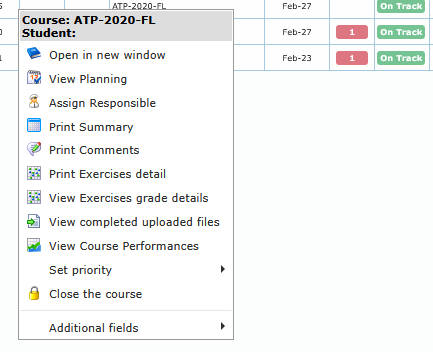
Course submenu is available from student row context and contains course-level operations.
| Action | What it does | Role/condition notes |
|---|---|---|
| Open in new window | Opens the selected course page | Available from course submenu |
| View Planning | Opens planning dialog for selected course/student | Available from course submenu |
| Group Course analytics | Opens Course Analytics for members of the selected student’s group | Visible only when the student belongs to a group and your role has analytics access |
| Assign Responsible | Opens responsible assignment dialog | Disabled if responsible assignment rights are missing |
| Remove responsible | Clears the current responsible assignment, with an option to alert that person | Disabled when no responsible is assigned or your role cannot manage assignments |
| Print Summary | Generates printable course summary | Available from course submenu |
| Print Comments | Opens printable comments output | Available from course submenu |
| Print Exercises detail | Generates exercises detail output | Available from course submenu |
| View Exercises grade details | Opens detailed exercise-grade dialog | Available from course submenu |
| View completed uploaded files | Opens completed files browser dialog | Available from course submenu |
| View Course Performances | Opens performance analysis window | Available from course submenu |
| Set priority | Set or remove priority level | Requires course-control rights for effective use |
| Close the course | Starts close workflow with reason dialog | Visible only for open courses and authorized roles |
| Re-open the course | Re-opens previously closed course | Visible only for closed courses and authorized roles |
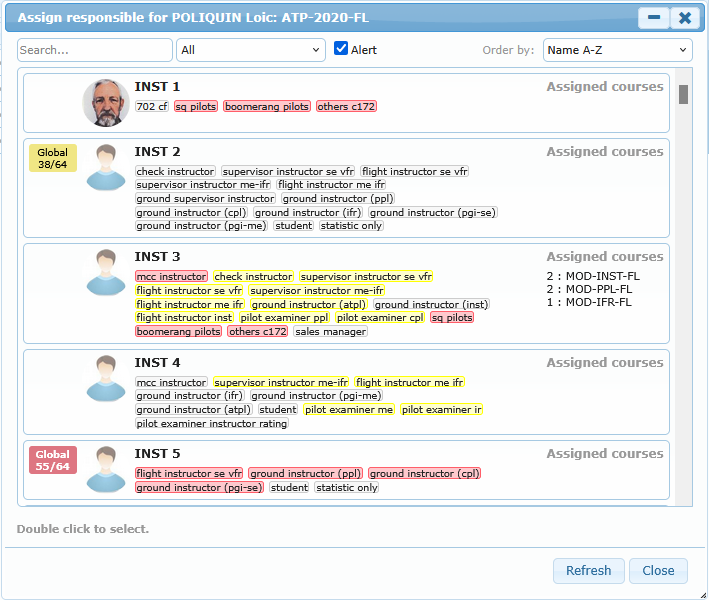
Assign Responsible dialog options:
| Option | Purpose |
|---|---|
| Search | Filter responsible list by text |
| Role filter | Narrow list by role |
| Alert checkbox | Include/exclude alert state behavior |
| Order by: Name A-Z / Name Z-A | Alphabetic ordering |
| Order by: Number of courses 0-9 / 9-0 | Workload-based ordering |
| Order by: Rank Best-Worst / Name Worst-Best | Rank-based ordering |
| Double click to select | Confirms responsible assignment |
Group Course analytics
Use Group Course analytics when you want to compare course activity for members of the selected student’s group. The action appears only when the row belongs to a group and your role can open course analytics. The analytics window opens with the eligible group members already selected.
Remove responsible
Use Remove responsible when an enrolment should temporarily have no assigned responsible person. This action is unavailable when no responsible person is assigned or when your role cannot manage assignments.
| Choice | Result |
|---|---|
| Yes and alert | Removes the assignment and alerts the previously assigned responsible person |
| Yes | Removes the assignment without sending that alert |
| No | Cancels the change |
After removal, the enrolment appears as No responsible in areas such as the Dashboard attention indicators until someone is assigned again.