
Published 9 January 2023, Updated 13 October 2026
The Calendar tab shows your activities day by day or month by month.
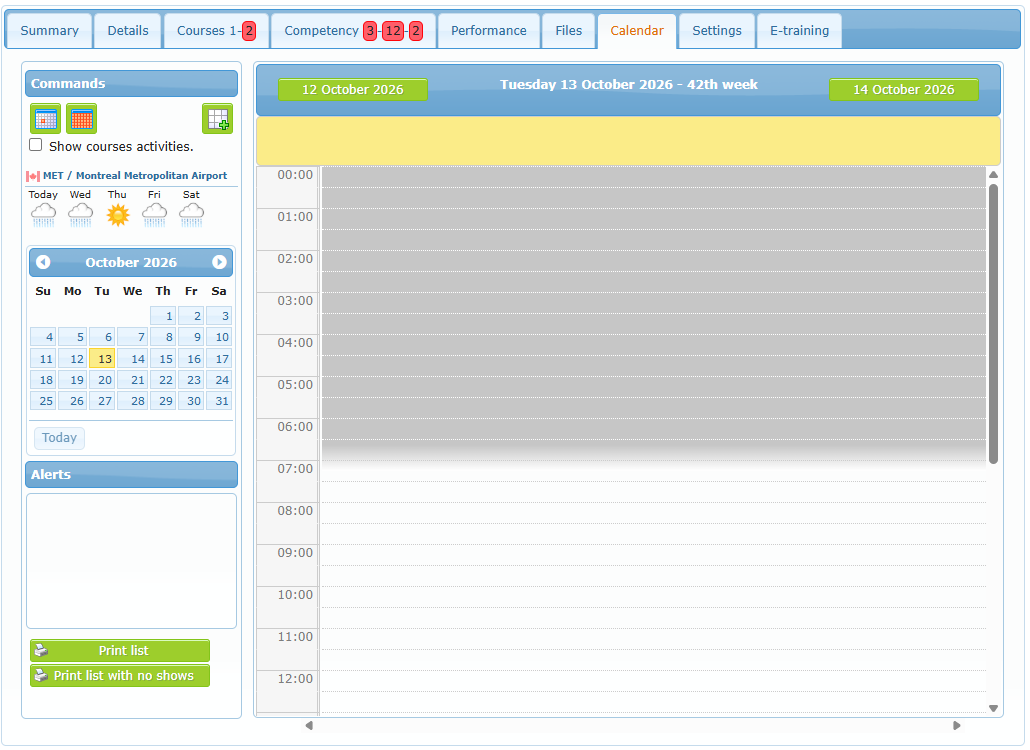
| Element | Use |
|---|---|
| Day / Month buttons | Switch between the daily view and the monthly view. In the monthly view, click a day to open it. |
| + button | Adds a personal calendar item. |
| Show courses activities | Adds the lessons you completed in your courses to the monthly view. |
| Weather | Forecast for the organization’s airport. |
| Small calendar and Today | Jump to another date. |
| Alerts | Your upcoming reminders. |
| Print list / Print list with no shows | Print the displayed period, with or without no shows. |
The calendar shows your personal items, automatic reminders for expiring competencies and your scheduler bookings. Bookings transferred to a flight record are no longer shown as scheduled items.
Adding a calendar item
Click the + button. The Set a task dialog opens.
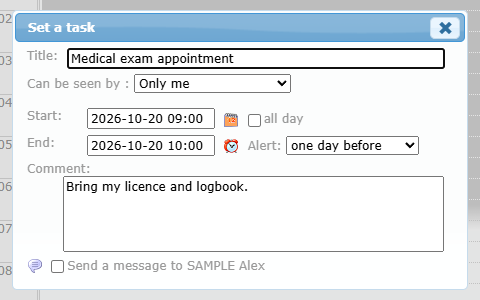
| Field | Meaning |
|---|---|
| Title | The text shown in the calendar. |
| Can be seen by | Only me, or a level: members of that level and higher can see the details. |
| Start / End / all day | When the item takes place. |
| Alert | When to be reminded (15 minutes to 2 years before), or never. |
| Comment | Free text. |
| Send a message to… | Also sends you an internal message about the item. |
Click Save to add it.