
Published 10 October 2026, Updated 10 October 2026
The completed list
The second part of the E-training tab lists every e-training you started or finished.
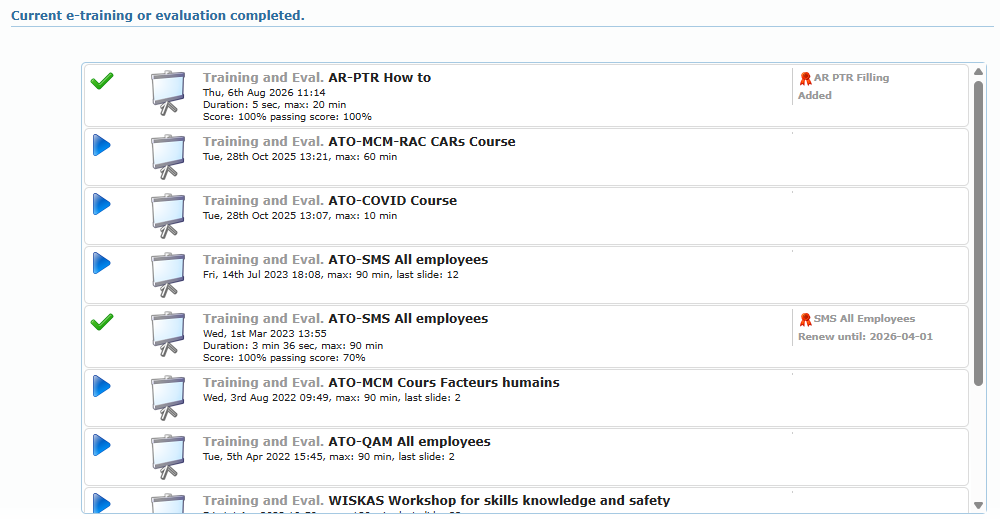
| Icon | Meaning |
|---|---|
| Green check | Finished. For a quiz, you reached the score to pass. |
| Red cross | Finished, but your score is below the score to pass. |
| Blue play | Started and not finished. Click to resume. |
Each line shows the date, the time you spent, the maximum time, the last slide reached and, for quizzes, your score and the passing score. For finished evaluations, click the line to open a printable copy of your results in a new tab.
The right column shows the competency validated by this attempt:
- Added: the competency did not exist in your profile and has been added.
- Renew until: date: the competency has been renewed until that date.
How a competency is validated
When you finish an e-training linked to a competency:
- If the e-training has a score to pass, your score must be equal to or higher than it. If there is no score to pass, finishing is enough.
- The competency is added to your profile, or renewed if you already have it and it can only be held once.
- Its effective date becomes today. Its expiry date is calculated from the rule shown on the e-training (for example 1 year later, or the 1st day of the 13th month).
- A comment “After undergoing” followed by the e-training title is saved with the competency, and an expiry reminder is planned in your calendar.
Competencies that can be renewed by an e-training
In the Competency tab of your profile, a small presentation board icon next to a competency means it can be renewed by an e-training.
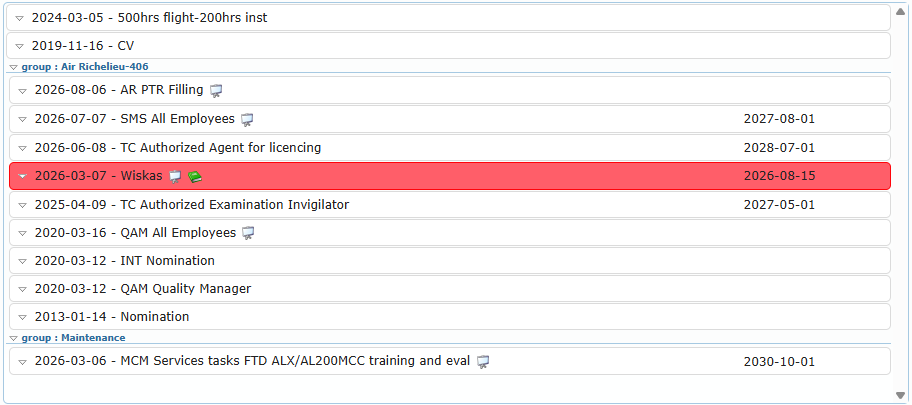
Move the mouse over the icon to see the tooltip “This competency can be renewed by an E-training. Click to launch!”. On your own profile, click the icon to launch the e-training directly in a new tab. It is the quickest way to renew an expiring competency: lines in red or yellow are expired or about to expire.
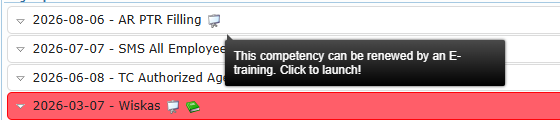
A green book icon next to a competency means it can be renewed by completing a lesson in a course instead.