
Published 10 October 2026, Updated 10 October 2026
E-trainings are online trainings prepared by your school or organization: courses with slides, evaluation quizzes, courses followed by a quiz, and surveys. You follow them on your own, from a computer or from your phone.
Most e-trainings are linked to a competency. When you pass the e-training, the competency is added to your profile or renewed automatically, with a new expiry date. This matters because competencies are used everywhere in AirSupervision: a role can require some competencies, a course can require its instructors to hold valid competencies, some flight activities can only be scheduled or recorded by members holding the right competencies, and expired competencies raise alerts. Passing the e-training on time keeps you allowed to do your job without waiting for a staff member to update your file.
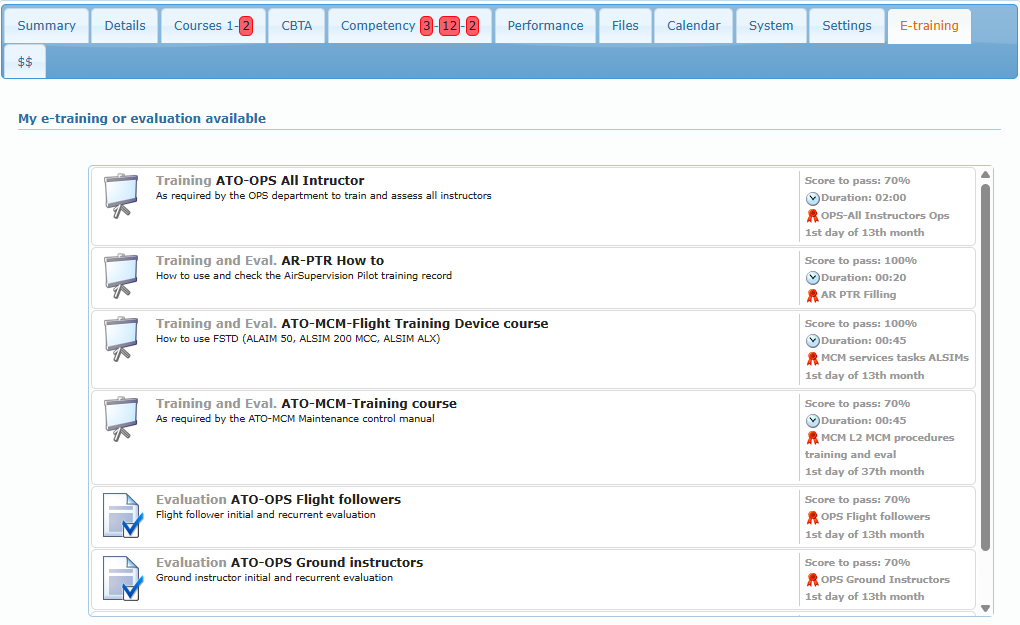
Which e-trainings you see
You only see the e-trainings that are open to you. An e-training is open to you when at least one of these is true:
- it is open to all members,
- it is open to one of your roles (for example “Flight Instructor” or “Office Members”),
- you already hold the competency that the e-training renews. This is how recurrent trainings reach the right people: everyone holding the competency can renew it.
Inactive or hidden e-trainings are never listed. Hidden e-trainings (usually surveys) are launched from a memorandum instead.
What you can do
| Task | Where | Article |
|---|---|---|
| Find an e-training and launch it | Your profile, E-training tab | Finding and launching an e-training |
| Continue a course you started | Your profile, E-training tab, completed list | Finding and launching an e-training |
| Check your results and the competencies they validated | Your profile, E-training and Competency tabs | Results and competencies |
| Follow e-trainings on your phone | Mobile version, My profile › E-training | Using the mobile version |
Articles in this chapter
- Finding and launching an e-training
- Results and competencies
- Using the mobile version