
Published 10 October 2026, Updated 10 October 2026
An event report is a short written report about something that happened during an activity: a flight, a taxi, a ground operation, a briefing, a maintenance task, and so on. It is written by a person in charge of safety or quality in your organization (for example the Safety Manager, the Chief Flight Instructor or the Quality Assurance team) and addressed to you because you were involved in the event.
When you receive one, you are asked to answer it: explain in your own words what happened and what may have contributed to it. Your answer is then evaluated by the person who sent the report, and the report is closed.
Answering an event report is not optional. If you leave it unanswered for too long, you may be restricted from scheduling activities or from starting activities, and you may be locked on the home page until you answer. See What happens if you do not answer.
Why event reports matter: the Safety Management System (SMS)
Event reports about flight safety are part of your organization’s Safety Management System, usually called the SMS.
An SMS is the organized way an aviation organization manages safety. It is required by the International Civil Aviation Organization (ICAO Annex 19) and by national aviation authorities for flight schools, operators and maintenance organizations. Instead of waiting for an accident, the organization looks for small events and hazards early, studies them, and fixes their causes before they lead to something serious.
An SMS rests on four pillars:
| Pillar | What it means for you |
|---|---|
| Safety policy and objectives | Management commits to safety and sets clear rules, responsibilities and a fair reporting policy. |
| Safety risk management | Hazards and events are identified, their risk is assessed (how likely, how serious) and actions are decided to reduce it. |
| Safety assurance | The organization checks that the actions work, follows safety indicators and looks for trends. |
| Safety promotion | Training and communication, so that everyone learns from the events — including yours. |
Your answer is the most valuable part of the report. Only the people who were there know what really happened, what they saw, what they understood and what made the situation difficult. Without your answer, the organization can only guess the causes, and the same event may happen again to someone else.
A just and fair reporting culture
An SMS works only if people report and explain honestly. That is why safety programs follow a just culture: the goal of an event report is to understand and prevent, not to blame. Honest errors, reported and explained openly, are used to improve procedures, training and equipment. A just culture still does not protect deliberate violations, gross negligence or illegal acts. Your organization’s safety policy describes exactly how it applies these principles.
When to use this: keep it in mind when you write your answer. A clear, factual and honest answer helps the whole organization and closes your report faster.
How you know you have an event report to answer
| Where | What you see |
|---|---|
| Message or e-mail | When the report is created, you usually receive an internal message and/or an e-mail inviting you to answer. The sender can choose not to send this alert, so also check the other places below. |
| Top bar icons | The Event reports or Quality Assurance findings alert icon leads to the event report page. |
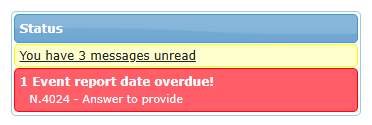
| Home page, Status panel | A red box Event report date overdue! lists each report with Answer to provide, once the answer delay is passed. Click it to open the event report page. |
| Important reminders pop-up | Appears on the pages you open when you have overdue actions on an event report. |
| Your profile | Red bars No scheduling allowed and/or No activities allowed when restrictions apply. |
| Reminders | The system can send you reminders at regular intervals until you answer. After several reminders without an answer, the Quality Assurance team can be alerted. |
The event report page
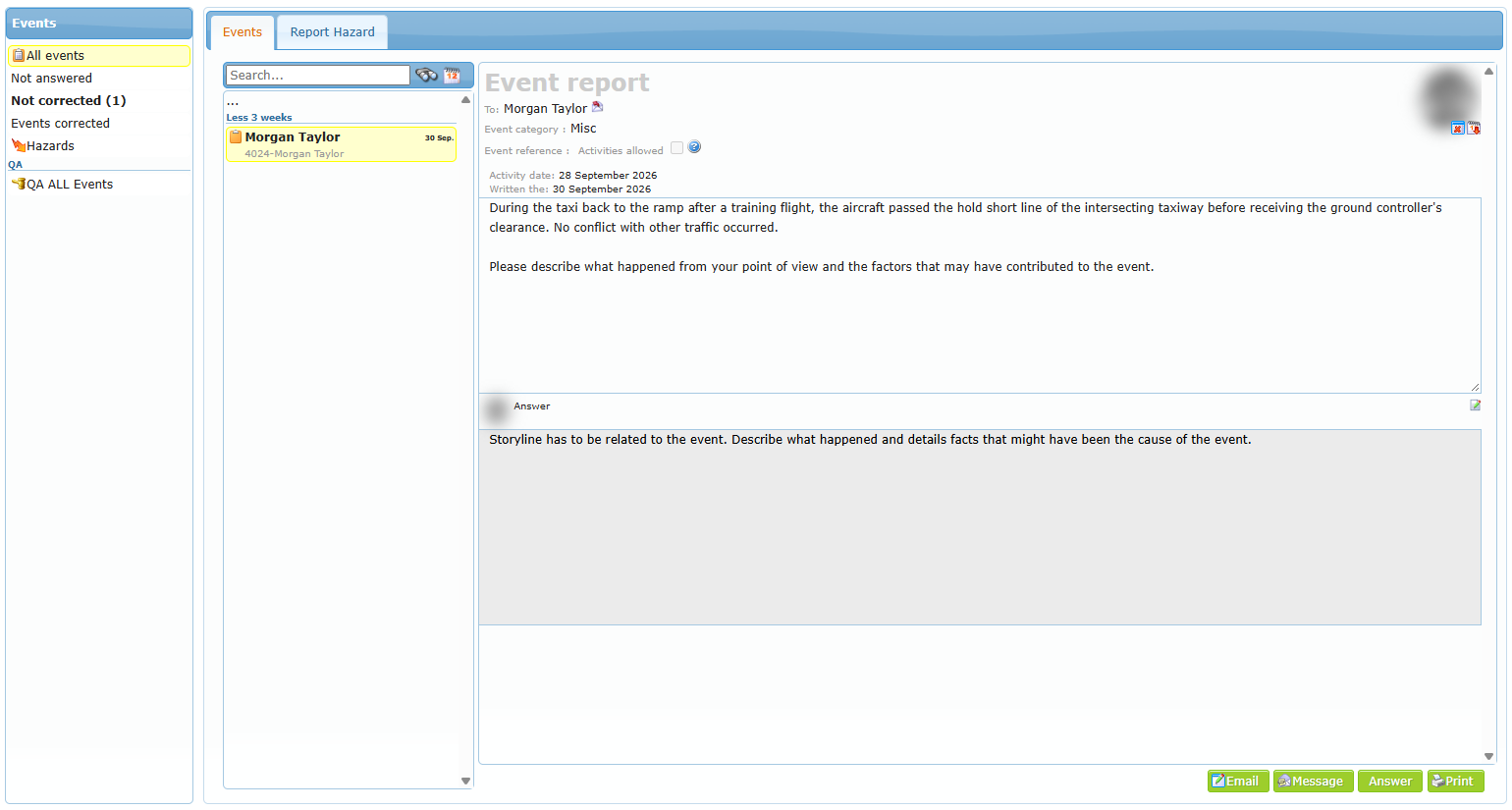
Open the page from the alert icon in the top bar or by clicking a red box on the home page. The page is called Event report center.
| Area | What it is for |
|---|---|
| Events tab | The list of the event reports addressed to you, and the report you opened. |
| Report Hazard tab | To report a hazard yourself (when this option is available to you). |
| Left panel | Filters: All events, Not answered, Not corrected (answered but not yet evaluated), Events corrected (closed), Hazards, QA ALL Events. A number in brackets shows how many reports are waiting in that box. |
| Search field | Type words to find a report. Hover over the field to see the extended search keywords (for example ID: followed by a report number). |
| Report list | Each line shows the person concerned, the report number and the date. A small icon tells you if the report has been answered or corrected. |
| Report details (right) | The report itself, your answer area and the buttons. |
You only see the event reports that concern you. Reports addressed to other members are not visible to you.