
Published 12 January 2023, Updated 12 October 2026
The Controls menu, in the main menu bar, groups the day-to-day management tools that require you to be connected with the proper credentials: members, courses, scheduling and flight records, working activities and accounting.
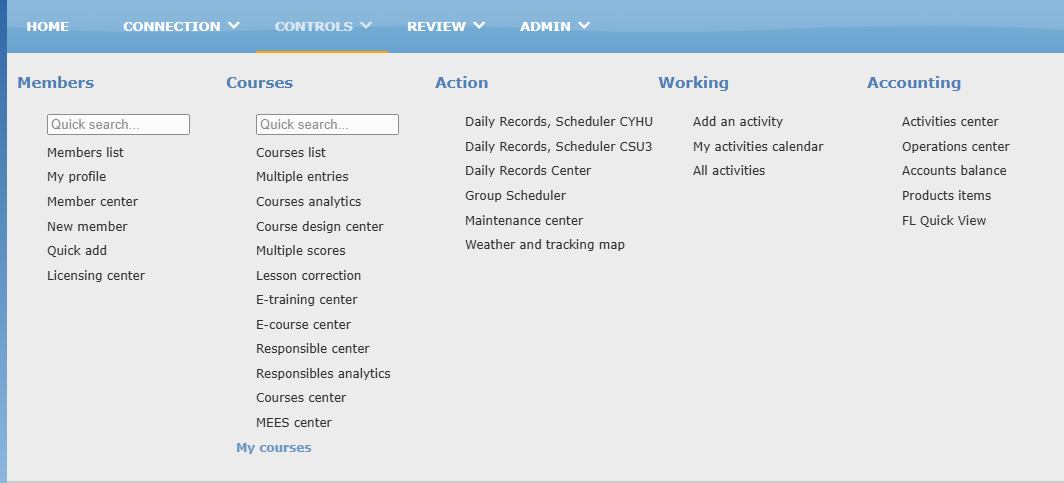
Items are grouped in columns by function. Most items require specific access rights, and some appear only when the feature is enabled for your organization. If you don’t see an item described below, you don’t have access to it or it is not used by your organization.
Menu items
In the table, Access rights required means that only members with the proper credentials see the item. Optional feature means that the item appears only if your organization uses this feature.
| Item | What it is used for | Access rights required | Optional feature |
|---|---|---|---|
| Members | |||
| Quick search | Type a few letters of a member’s name, then choose the member in the list to open the profile quickly. | X | |
| Members list | Displays the list of members. | X | |
| My profile | Opens your own member profile. | ||
| Member center | Searches and follows members with filters, a detailed member panel and follow-up tasks. | X | |
| New member | Adds a new member with all details. | X | |
| Quick add | Adds a member with minimal information. | X | |
| Licensing center | Pilot licensing management. | X | X |
| Courses | |||
| Quick search | Type a member’s name, then choose the member in the list to open that member’s courses. | X | |
| Courses list | Displays the list of courses. | X | |
| Multiple entries | Validates the same lesson for several enrolled students at once, for example after a group ground class. | X | |
| Courses analytics | Compares members enrolled in the same course and their progress side by side. | X | |
| Course design center | Creates and maintains courses, phases and lessons. | X | |
| Multiple scores | Enters scores or grades for several members at once. | X | |
| Lesson correction | Processes the correction requests sent for recorded lessons. | X | |
| E-training center | Creates and manages e-trainings: surveys or trainings validating competencies. | X | X |
| E-course center | Creates and manages e-courses (online courses). | X | X |
| Responsible center | Shows who is responsible for each open course and lets authorized members assign, transfer or remove that responsibility. | X | |
| Responsibles analytics | Compares responsible members: activity, schedules, recommendations, notes and follow-up work. | X | |
| Courses center | Manages students, courses, attendance sessions, indicators and follow-up tasks. | X | |
| MEES center | Prepares MEES reports from report templates. | X | X |
| My courses | Opens the list of your own courses. The courses you are enrolled in are also listed right below it: click one to open it directly. | ||
| Action | |||
| Daily Records, Scheduler | Opens the scheduler and the daily flight records. One entry is shown for each base of your organization, followed by the base code. Members without daily records access see Scheduler only. | ||
| Daily Records Center | Searches and follows the planned movements and the completed flight records. | X | |
| Group Scheduler | Plans a full ground course for a group of students, then publishes it to the scheduler. | X | |
| Maintenance center | Controls aircraft availability, squawks, maintenance visits and technical follow-up. | X | |
| Weather and tracking map | Displays the flight tracker and the weather map. | ||
| Working | |||
| Add an activity | Adds an activity to your working sheet. | X | |
| My activities calendar | Displays your activities calendar. | X | |
| All activities | Displays the activities calendar of all members. | X | |
| Accounting | |||
| Activities center | Lets accounting validate the activities requested by members. | X | |
| Operations center | Accounting operations: invoicing, voiding and more. | X | X |
| Accounts balance | Displays the members’ account balances. | X | X |
| Products items | Sets the accounting product items. | X | X |
| FL Quick View | Quick access to the flight records for accounting follow-up. | X |