
Published 18 October 2026, Updated 18 October 2026
CBTA (Competency-Based Training and Assessment) links the lessons of your courses to competency frameworks. Click CBTA to open the Competency Based Training and Assessment Manager.
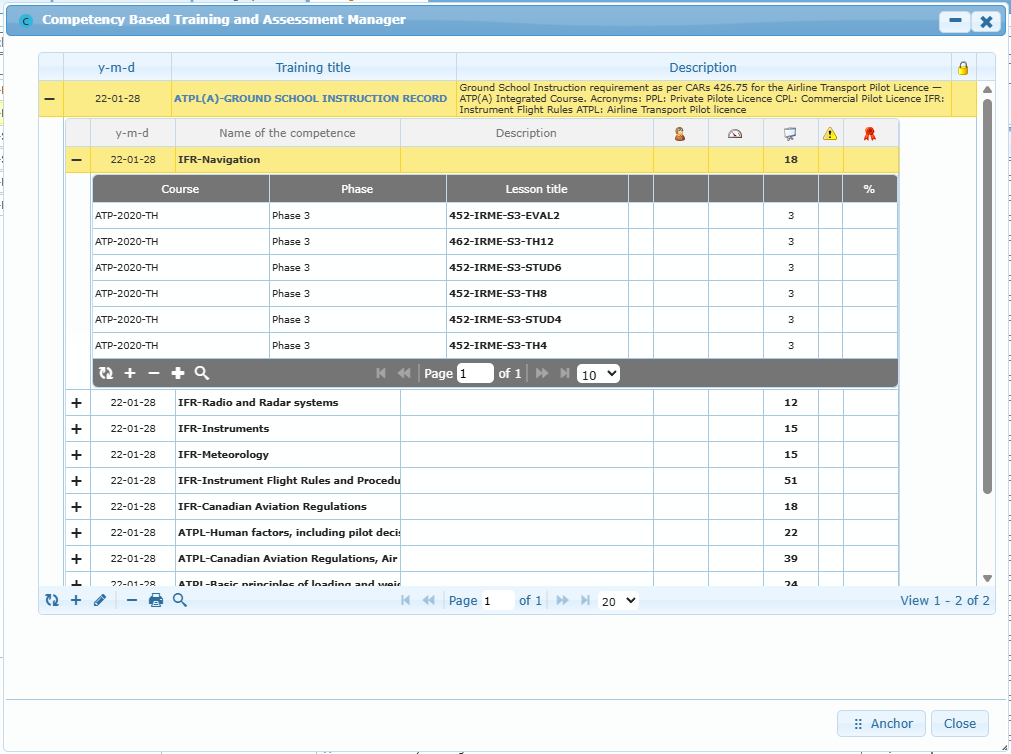
The manager has three levels:
| Level | Content |
|---|---|
| Training framework | Date, Training title, Description and a lock icon showing whether it is active. |
| Competencies (click + on a framework) | Name of the competence, assessment type, description, observable behaviour, final competence standard, conditions, and counters of linked lessons. |
| Lessons (click + on a competency) | Course, phase and lesson linked to the competency, with their counters and expected percentage. |
Use the toolbar of each level:
| Button | Action |
|---|---|
| Refresh | Reloads the grid. |
| + | Adds a framework or a competency. At lesson level, + adds the lesson currently selected in Design a lesson; the other add button adds ALL listed lessons of the phase. |
| Pencil | Edits the selected line. |
| – | Deletes or removes the selected line after confirmation. |
| Printer | Prints the selected framework. |
| Magnifier | Shows the search toolbar. |
Anchor docks the manager beside the page so you can keep it open while selecting lessons.
A lesson linked to a competency shows the blue C marker in the lesson list and the CBTA badge in its header; its links are listed in Content › Lesson information and links.
Important: removing a competency or a lesson link changes how training evidence is interpreted. Follow your approved competency framework.