
Published 14 October 2026, Updated 14 October 2026
Part of the Activities Center guide.
Printing and Excel export
Use the printer button in Current or Accepted. The same window creates either a PDF or an Excel workbook. The bold message at the top tells you the scope that will be used.
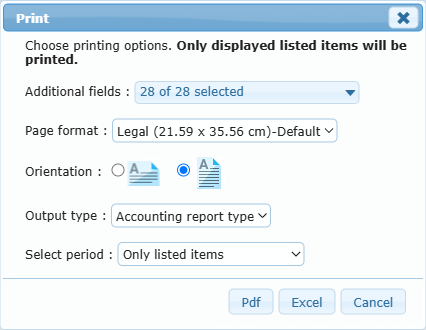
Exactly what will be printed
| Situation | Printed/exported result |
|---|---|
| One or more rows are checked | Selected rows only. This takes priority over the rest of the visible list. |
| No rows are checked and “Only listed items” is used | The entries matching the current filters on the current grid page, up to the selected row limit. |
| Accepted tab with a named period selected | All entries that match that accepted period and the active filters. The current page limit is not applied to this period report. |
| Activity-type row filter is active | Only entries matching those selected activity types, including when a named period is printed. |
Payroll safety check: if the pager shows more records than the current row limit, “Only listed items” does not mean every matching record. Choose All, print each page separately, or—on Accepted—select the named period. Clear any unintended date, status, advanced-search, or activity-type filter before producing the final report.
Printing option reference
- Additional fields: choose which currently visible list columns should be included in a List type report. Hidden columns are not offered until they are shown in the grid.
- Page format: Letter (21.59 × 27.94 cm), Legal (21.59 × 35.56 cm), A4 (21 × 29.7 cm), or A3 (29.7 × 42 cm).
- Orientation: Landscape gives more horizontal space for many columns; Portrait is better for a short list of fields.
- Output type – Accounting report type: produces the standardized accounting layout organized for payroll review, using its established report columns. For PDF, this report uses the standard Letter landscape layout.
- Output type – List type: reproduces the chosen grid fields in a straightforward list. Page format, orientation, and Additional fields are especially important for this option.
- Select period: appears for Accepted. “Only listed items” follows the visible list/page. A named period produces the complete matching period subject to active filters.
- PDF: opens a printable document in a new tab.
- Excel: downloads or opens an Excel workbook containing the same chosen scope.
- Cancel: closes the window without producing a file.