Published 15 October 2026, Updated 15 October 2026
The manager calendar
The calendar displays one week. Unlike the member view, all appointment types are merged and you do not choose a type first.
Toolbar and legend
| Control | Action |
|---|---|
| Previous week / Next week arrows | Move one week (the keyboard left and right arrows also work). Managers may go back to past weeks. |
| Current week | Jump back to today’s week. |
| Magnifier | Open Search appointment. |
| Circular arrow | Refresh. |
| Settings | Open the appointment type settings. |
Legend: Available, Open, not a start time, To Reschedule, Unavailable, My Schedule, Users’ schedules. Users’ schedules marks the appointments of members, which managers can open.
Hover a cell for a short explanation of its state. Days that are closed are labelled Closed.


Searching for a member’s appointment
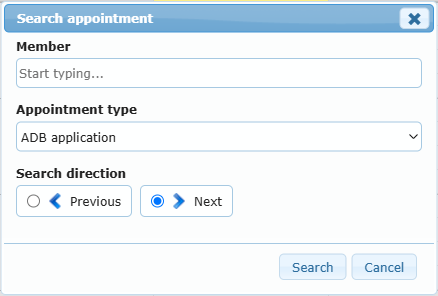
- Click the magnifier. Search appointment opens.
- Type in Member and choose the person from the list.
- Choose the Appointment type (the list offers Any when several types exist; with a single type, it is already selected).
- Choose Search direction: Previous or Next (Next is default).
- Click Search. The calendar jumps to the matching appointment’s week and opens it.
If nothing is found, No matching appointment was found. is shown.