Published 22 February 2026, Updated 2 March 2026
Use Close for actual instructor to finalize attendance for a live session.
Step-by-step:
- Open right-click menu on an open active session.
- Select Close for actual instructor.
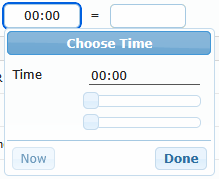
- Enter From and To times.
- Verify computed duration.
- Confirm each attendee pass state.
- Enter scores and score max values when required.
- Add comment if needed.
- Click Close the session.
Close dialog field reference:
| Field | Required | Notes |
|---|---|---|
| From | Yes | Must be valid HH:mm and within allowed range |
| To | Yes | Must be valid HH:mm, after From, within allowed range |
| Duration result | Auto | Calculated from From/To |
| Passed checkbox per attendee | Yes | Stored for each attendee |
| Score | Required only when lesson requires score | Must be valid non-negative number |
| Score max | Required only when lesson requires score | Must be valid positive number |
| Reset scores icon | Optional | Clears all score fields in dialog |
| Comment | Optional | Stored with close action |
Important behavior:
- When score mode is active, filling one score max can propagate to empty score max fields.
- If no attendees are available, session cannot be closed.
- Session close saves official attendance completion data.