
Published 11 October 2026, Updated 13 October 2026
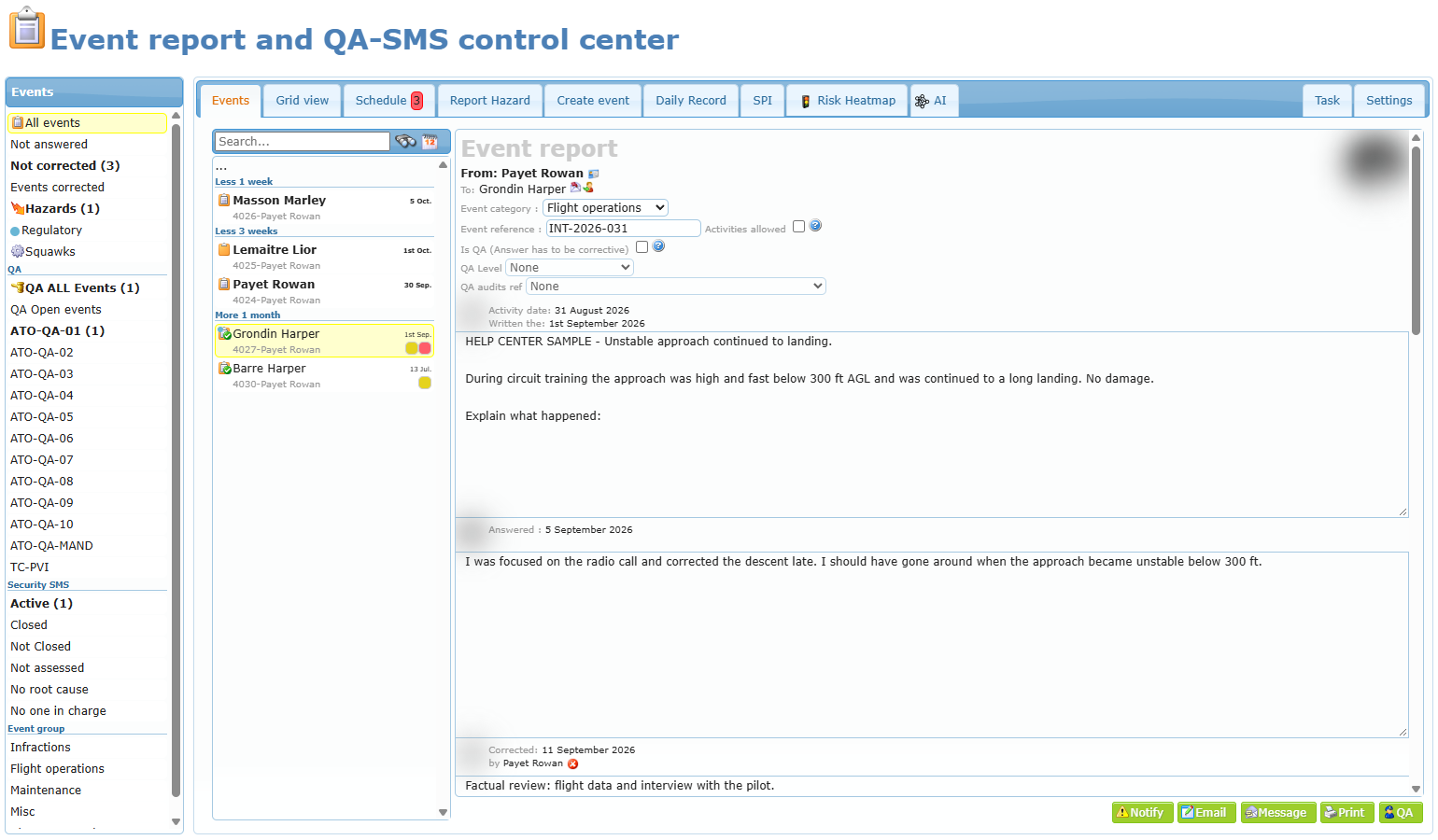
The Event report Center is the page where your organization records, follows and closes everything that can affect safety and quality:
- Event reports — a report about something that happened during an activity (a flight, a taxi, a briefing, a maintenance task…), addressed to the member involved, who must answer it.
- Hazard reports — a report sent by any member about a hazard they noticed (for example birds near a runway, a damaged sign, a confusing procedure). Nobody has to answer it; the safety team analyzes it.
- QA findings — Quality Assurance findings that require a corrective action plan from the member concerned.
- Squawks — technical defects reported on an aircraft, when the maintenance link is enabled.
For each report, the page lets you follow the whole cycle: creation → answer → correction (evaluation) → Quality Assurance review (optional) → Security SMS risk assessment → corrective actions → closing.
The page title depends on your access. A manager sees, for example, Event report and QA-SMS control center; a member who only answers reports sees Event report center.
Who can do what
What you see on the page depends on the options set in your member profile by an administrator. The Settings tab shows who currently holds each option.
| Option (as shown in the Settings tab) | What it allows |
|---|---|
| Members authorized to see an event report | See all event reports, create them, write corrections as drafts, add notes, notify members, change the member concerned, reopen answers. This is the basic “event report manager” access. |
| Members authorized to correct an event report | In addition, close an event report with Save and Close Event (final evaluation). Without this option, a manager can only save a correction as a draft. |
| Members authorized to see an event report and evaluate Risk Management (SMS) | Fill in and change the Security SMS section (occurrence category, severity, scheduled actions, root cause…), see the SMS folders, the Grid view and Schedule tabs. |
| Members part of the Quality Assurance Team | See QA folders, write the Quality Assurance inspection, set an event under QA monitoring, mark a report as a QA finding. |
| Members always allowed to see event report (no interactions possible) | Read-only access to reports (and the Schedule tab), without any action. |
| Highest administrator level | Can Delete a report and see the full history with notes. |
Other access rights can show only the analysis tabs (SPI, Risk Heatmap, AI) to a member, for example an accountable executive.
The tabs
| Tab | Who sees it | What it is for |
|---|---|---|
| Events | Everyone | Folders, search and the list of reports; the selected report opens on the right. |
| Grid view | SMS evaluators, auditors | All reports in a sortable, filterable table with export to Excel or PDF. |
| Schedule | SMS evaluators, auditors, read-only members | Calendar of the projected dates of corrective actions still open. A red number shows how many dates are already passed. |
| Report Hazard | Members allowed to report hazards | Form to send a hazard report. |
| Create event | Event report managers | Form to create an event report addressed to a member. |
| Daily Record | Event report managers | List of the recorded flights; double-click a flight to prepare an event report about it. |
| SPI | SMS and QA members, safety overview access | Safety Performance Indicators: totals, delays, risk charts and top-5 lists. |
| Risk Heatmap | SMS and QA members, safety overview access | Weekly heatmap of occurrence categories with trends. |
| AI | Same as Risk Heatmap, when the AI option is active | Weekly AI-written safety signal assessment (decision support only). |
| Task | Event report managers | Team task list for safety follow-up work. |
| Settings | Event report managers | Your personal options (alerts, signature) and the list of authorized members. |

The life of an event report
- Creation — a manager creates the report in Create event (or from Daily Record), or a member sends a hazard from Report Hazard.
- Answer — the member concerned writes an answer and requests an evaluation. If they do not answer in time, reminders are sent and restrictions can apply.
- Correction (evaluation) — a manager analyzes the event and the answer, writes the correction (findings, causes, actions) and closes the event.
- Quality Assurance (optional) — a QA member inspects the report and records the inspection.
- Security SMS — the safety team classifies the occurrence, rates its severity, gets the safety index from the risk matrix, plans corrective actions with projected dates and people in charge, and finally sets the Closed date and Completed date.
The following articles explain each step in detail:
- Finding and filtering reports
- Reading and managing a report
- Creating reports
- Evaluating and closing a report (Correction)
- Quality Assurance
- Security SMS
- Analysis tabs: Grid view, Schedule, SPI, Risk Heatmap and AI
- Settings, Task list, reminders and restrictions